
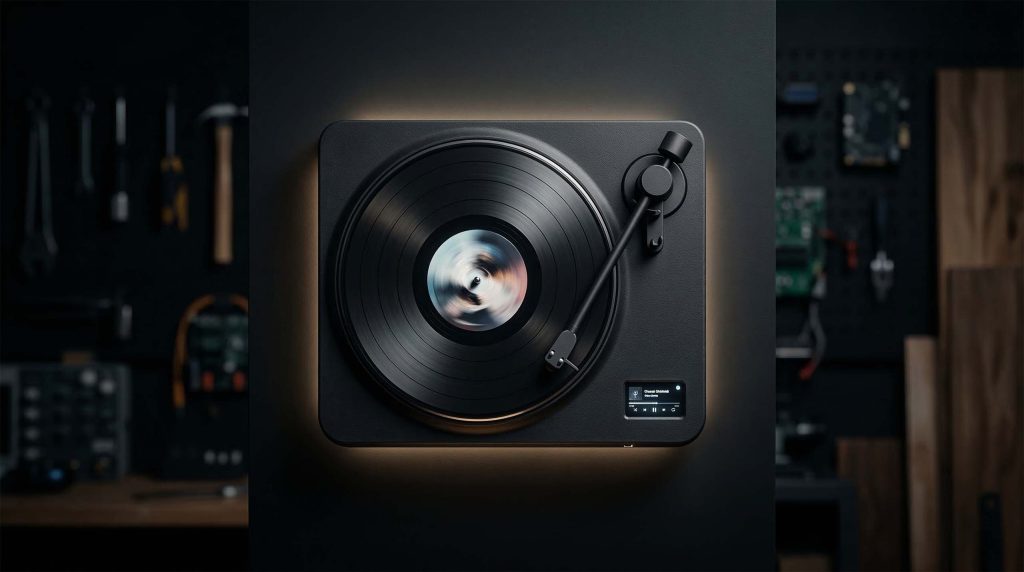
Vinyl is a ritual. Spotify is a utility. And most “smart” music controls are… a phone screen you smudged while eating chips. In “I Built A Vinyl Player For Spotify” (The Raccoon Lab), the whole point is to take the physical vocabulary of a turntable—tone arm, spinning platter, a satisfying knob—and wiring it into modern streaming. The result is a wall-mounted “digital vinyl” controller where the disc becomes a seek wheel, the tone arm becomes play/pause, and the UI is split between “vibes” (spinning album art) and “useful” (track/progress).
Subtitle: The Raccoon Lab’s wall-mounted digital turntable uses a Pi + ESP32, dual displays, and DJ-style scrubbing to make streaming feel physical again.
The problem nobody asked for (and the exact reason it’s worth building)
Streaming won because it’s frictionless. Vinyl still wins because it’s intentional. You don’t “accidentally” put a record on—you commit. You touch the tone arm. You watch something spin. You feel like a person with a personality.
So what if you could keep the ritual, but swap the grooves for a Spotify login?
That’s the pitch behind The Raccoon Lab’s build: a custom “digital vinyl” turntable that’s not trying to be high-end audio gear—it’s trying to be a better interface for streaming.
What they built (the satisfying “old body, new guts” version)
At the heart of the project are two brains doing two different jobs:
- A Raspberry Pi 3B+ runs the “Spotify device” side using spotifyd, meaning it can stream Spotify like a proper client and output audio to Bluetooth speakers while tracking live metadata.
- An ESP32 handles the physical world: sensors, knob presses, tone arm position, and the whole “touch it and it responds instantly” part that Linux is famously bad at.
The headline feature is the platter itself: the rotating disc isn’t just decoration. You can manually rotate it to scrub forward/back through a track. That single decision is why this thing feels like vinyl instead of “yet another remote.”
Dual displays: one for vibes, one for truth
The build uses two screens, and the split is genuinely smart:
- A round 1.28-inch screen in the center of the spinning disc that shows album art and rotates with the platter.
- A 1.77-inch rectangular display that handles the boring-but-critical stuff: track title, artist, and progress.
In other words: one display is your little dopamine gremlin. The other is your pilot instrument.
The controls (aka: yes, the tone arm actually does something)
This isn’t a fake prop turntable. The physical controls map cleanly to what your hands already expect:
- Tone arm = play/pause, sensed with an optical sensor.
- Platter rotation = seek/scrub, so you can “rewind” a track with your fingers.
- A metal control knob handles volume, track skipping (single/double press), and even LED color changes.
That’s the entire thesis: you can operate it without looking at a phone, without swiping, and without losing the “I am doing a thing” feeling that vinyl people won’t shut up about.
The engineering nightmare bits (the parts that separate ‘cute’ from ‘finished’)
Getting wires through a spinning disc
Putting a display in the center of a rotating platter is immediately a problem: the wiring wants to twist itself into modern art.
Instead of the obvious “give up,” the builder designs a custom gear/hollow-shaft solution so cables can route through the center of the rotating assembly. It’s the most unglamorous part of the project, and also the most important if you want it to look clean.
Making it feel ‘clicky’ on purpose
The tone arm gets magnetic assistance so it has that satisfying, intentional movement—less floppy plastic lever, more “this is a real control with a detent.”
Motor control that survives being grabbed like a DJ
The platter isn’t just spinning dumbly. Motor control uses a TMC630 driver chip plus a magnetic encoder, which is the recipe for “precise enough to behave when humans do chaotic human things,” like nudging, dragging, or spinning it.
Heat, and why fans would ruin the vibe
During testing, the Pi ran hot. The fix: passive heatsinks positioned for natural convection—quiet, clean, and in-theme.
Software stack: simple diagram, annoying reality
The system runs a headless OS and the Pi and ESP32 communicate over UART.
In spirit, it’s:
- ESP32 reads physical inputs + sends events
- Pi translates events into Spotify actions and pushes UI state (track, progress)
- Displays and LEDs reflect what’s happening
If you’ve ever done Spotify integration, you already know where the pain is: authentication/token handling and “which device am I controlling right now?” But once it’s stable, this approach is wonderfully modular.
Compare & contrast: three ways to make Spotify feel physical
This project is part of a growing little niche: “give streaming a body.” Here are three approaches, and what they’re best at.
1) RFID ‘record’ players (selection ritual first)
A strong comparable is AKZ Dev’s RFID record player build, where tagged “records” trigger albums/playlists, and the device uses sensors + a motor to deliver the illusion of a record player while Spotify supplies the audio.
- Coverage: https://www.hackster.io/news/combine-the-convenience-of-spotify-with-the-vibes-of-vinyl-b979f84a8e7e
- Repo: https://github.com/fatihak/RFID-Record-Player
- Reddit context: https://www.reddit.com/r/raspberry_pi/comments/1qff7ch/i_made_a_record_player_that_controls_music_on/
Tradeoffs:
- Wins at: that “put the record down and it starts” magic
- Loses at: expressive scrubbing/seek control (usually)
2) Minimal desk controllers (utility first)
The PrestoDeck is basically the clean, product-y version of “Spotify, but physical”: small device, display, basic controls.
Tradeoffs:
- Wins at: simplicity + daily usability
- Loses at: theater (no tone arm drama)
3) Metadata displays (glanceability first)
If your goal is “stop unlocking my phone to see what’s playing,” there are builds like a Spotify color e‑ink desk display.
Tradeoffs:
- Wins at: aesthetics + low distraction
- Loses at: control (mostly informational)
Where The Raccoon Lab build lands:
It’s the most ‘vinyl’ in interaction, because the platter is literally a time control surface. You’re not just selecting tracks—you’re physically manipulating playback.
How you’d build something like this (high-level blocks, no fake BOM)
If you’re tempted to build your own “digital vinyl” Spotify controller, the architecture is pretty clear:
Hardware blocks
- SBC running Spotify client (Pi + spotifyd)
- Microcontroller for inputs (ESP32)
- Platter motor + driver + position sensing (encoder)
- Tone arm sensor (optical / hall / switch)
- Displays (one for album art, one for metadata)
- LEDs + a main knob
- Quiet thermal strategy (passive where possible)
Software blocks
- Spotify auth + playback control
- Input debouncing + smoothing
- Seek mapping that feels musical (not twitchy)
- UI/state updates for metadata
- Reconnect logic (Bluetooth/Wi‑Fi will test your spirit)
Gotchas / what will break first
- Spotify auth/device-control edge cases
- Encoder noise → jittery scrubbing
- Mechanical tolerances → wobble and inconsistent feel
- Heat soak in a tight enclosure
- Bluetooth being Bluetooth
Closing thought
This is what “Analog Modern” looks like when you stop talking about it and start printing parts: steal the best part of the old object (ritual + tactile control), keep the best part of the new system (infinite library), and make the interface fun again.
Build highlights (from the video)
- Manual platter rotation used for track scrubbing/seek: [01:17]
- Round rotating album-art display + rectangular metadata display: [04:14], [04:22]
- Tone arm triggers play/pause via optical sensor: [05:33]
- Motor driver + magnetic encoder enabling DJ-style manipulation: [06:20]
- Pi 3B+ running spotifyd + ESP32 over UART, plus passive thermal approach: [07:42], [08:06], [11:14]